
×
New on the blog
Meet Astro. The AI operating system for AIQ.
"Build me a 20% off campaign for lapsed customers." Astro can have it ready before you finish your coffee. You decide when it sends.
See what Astro can do →New on the blog
"Build me a 20% off campaign for lapsed customers." Astro can have it ready before you finish your coffee. You decide when it sends.
See what Astro can do →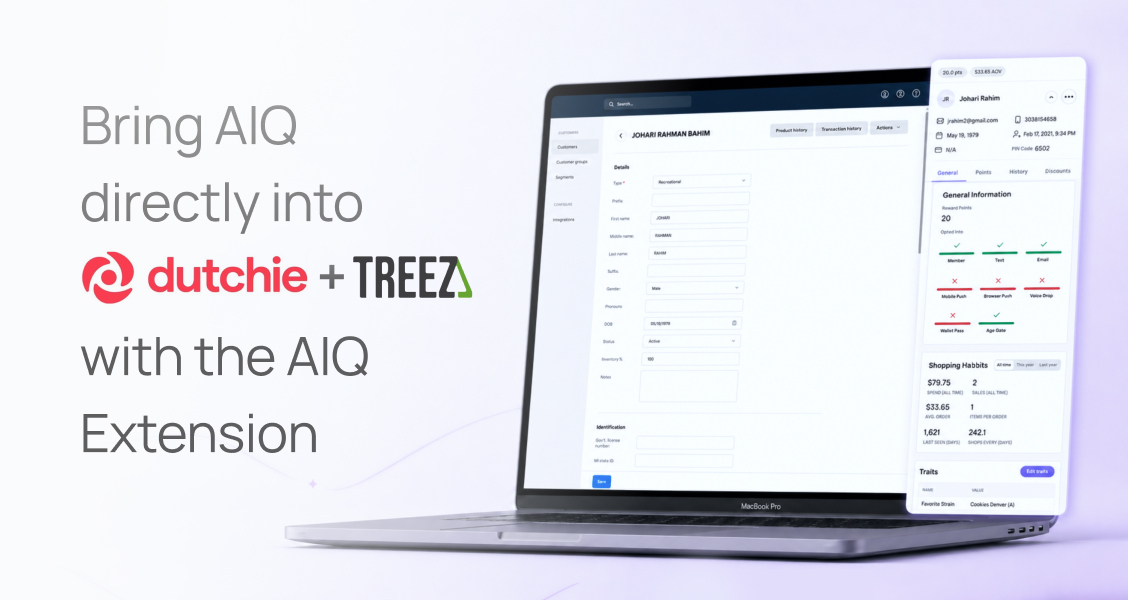
The AIQ Extension is a free Chrome extension that puts loyalty status, customer tags, opt-in data, and discount syncing directly inside Dutchie and Treez. Your team installs it once, opens the POS as they normally would, and AIQ appears in the checkout workflow. No new tabs, no separate login, and no additional fees for AIQ customers.
For years, Dutchie and Treez operators have told us the same thing: I want AIQ to be native inside my POS.
The reason is obvious. That is where your team works. That is where transactions happen. That is where decisions get made in real time, while the customer is standing at the counter.
But deeper POS integrations have always been slow to get prioritized, limited in scope, and completely out of your control. So we took a different approach and built the extension ourselves.
The AIQ Extension brings your customer data, loyalty insights, and marketing intelligence into your existing POS workflow.
Install it once and AIQ loads inside Dutchie or Treez automatically.
The moment a transaction starts, your staff gets instant visibility into the customer they are serving:
No more guessing. No more asking for information you already have. No more disconnected systems.
Without context, your budtenders are flying blind. They are processing an order rather than selling.
With the AIQ Extension, your team can:
This is how you turn your POS from a checkout tool into a revenue-driving surface.
This is the operational bottleneck we hear about most. Build a discount in your POS, then rebuild the same discount in AIQ. It is repetitive, time consuming, and a real bandwidth constraint on lean teams.
The AIQ Extension removes that step.
When the extension detects discounts that exist in your POS but not in AIQ, your team sees a simple prompt asking whether you want to sync them. AIQ then copies those discounts into the platform and creates them as drafts, so your team can review and activate without starting from scratch.
What that means day to day:
For a lot of operators, this alone removes the single biggest blocker in their weekly workflow and shortens the path from idea to live promotion.
Dutchie and Treez are powerful systems, but no POS was built to handle everything across marketing, loyalty, and customer data. The extension fills those gaps:
Operators are running the AIQ Extension across multiple locations today. The results they report:
Installation takes under a minute and requires no help from your POS provider.
There are no additional fees for AIQ customers, and no implementation project to schedule.
Install the AIQ Extension for Chrome
Yes. The extension is free to download, free to install, and available at no additional cost to AIQ customers.
Dutchie and Treez today, with more coming soon.
No. The extension runs in Chrome alongside your POS, so there is nothing to request and no integration queue to wait in.
Google Chrome. Install it from the Chrome Web Store on each machine your team uses at the counter.
No. The extension surfaces customer context as the transaction opens, so your team spends less time looking things up.
The extension installs per browser, so it should be installed on each register or workstation your team uses.
You should not have to wait on your POS provider to unlock better customer experiences. And your team should not have to work across disconnected tools to do their job well.
Now they do not have to. AIQ is where your team already works, inside your POS.


.jpg)
